If you’ve ever worked with Sinamics S210 servo drives, one question comes up time and again—especially from engineers who are testing solutions for small-batch production lines, lab automation setups, or custom machine prototypes: Can this compact, high-performance drive operate without a central PLC or controller? As a supplier who’s worked with Sinamics S210 for over five years, I’ve fielded this question from startup engineers building their first pick-and-place machine, maintenance teams troubleshooting existing lines, and even hobbyists putting together CNC cutters in their garages. The short answer is yes—but there’s a lot of nuance to that “yes” that makes a big difference depending on your use case, and it’s not as simple as plugging in power and hitting run. Sinamics S210
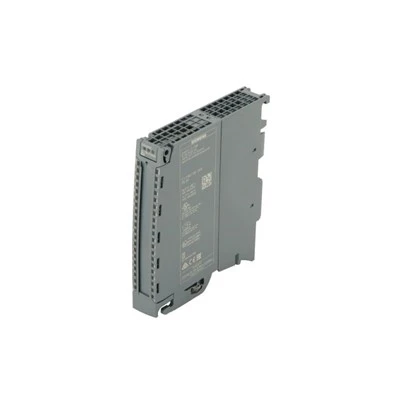
Let’s start with what standalone mode actually means for Sinamics S210, because that term gets thrown around loosely in the automation world. For many people, “standalone” means no external controller at all—no PLC, no HMI, no industrial network like Profinet or Modbus. The drive makes all its own decisions for speed, position, and motion sequencing. For others, it might mean operating without a dedicated central controller, using a small local HMI or a pre-programmed logic module directly on the drive. Sinamics S210 fits both definitions, but you have to pick the right tools to make it work.
When Sinamics S210 launched, Siemens designed it as a versatile drive line that could work in both networked systems and standalone setups. The key feature that enables this is its built-in functionality, specifically the Integrated Safety and Basic Positioning. Wait, Basic Positioning—that’s the core of standalone operation here. Basic Positioning is a function built into every Sinamics S210 drive, no extra modules required, that lets you program up to 16 position setpoints directly on the drive itself. You don’t need a separate PLC to send those setpoints; you input them via the drive’s control panel, or via a simple local HMI if you want a more user-friendly interface.
Let me walk you through a real example. Last year, a small medical device client of ours was building a prototype for a small lab pipette that needed to move in four precise positions: pick up liquid at 0mm, move to a test tube at 50mm, dispense at 50mm, retract to 20mm for a shake, then return to 0mm. They didn’t want to use a full PLC for the prototype because it added cost and complexity, and the production version would only use a small dedicated controller later. They needed something that could run the motion sequence on its own, without relying on external commands. We configured their Sinamics S210 with a 1FL6 servo motor, set up Basic Positioning parameters, and programmed each of the four position points, along with the speed for each move and the acceleration/deceleration ramps. The entire sequence ran automatically once enabled, no external network or controller required. That’s classic standalone mode in action.
But it’s not just Basic Positioning that makes standalone operation possible. Sinamics S210 also has extended positioning functions, though those do require a small add-on module if you need more than 16 setpoints or more complex motion. Wait, no—actually, basic positioning is standard, extended positioning needs the Sinamics S210 Control Unit CU210-2, which is included in most standard S210 drive packages. The control unit is the brain of the drive, and it has enough processing power to handle not just position commands but also simple logic. For example, you can set up the drive to respond to limit switches connected directly to its I/O ports—so if the pipette hits a hard stop at 0mm, the drive automatically slows down or stops, no PLC needed. That’s another key part of standalone mode: the drive can handle I/O events on its own, not just follow pre-programmed sequences.
I’ve also had clients use Sinamics S210 in standalone mode for conveyor applications. A food packaging company needed a small conveyor that would run at variable speeds, start and stop automatically when a product was detected, and adjust speed based on line load. They used a Sinamics S210 with a gear motor, set up the speed control mode, connected a simple photoelectric sensor to the drive’s digital input, and programmed the drive to start when the sensor detected a product, run at 500rpm, and stop after two seconds. No PLC, no network, just the drive, a sensor, and power. That’s a perfect low-cost standalone application for S210, especially for projects where you want to avoid the cost and complexity of a full automation system.
But there are limits to what you can do in Sinamics S210 standalone mode, and that’s where I’ve seen clients run into trouble. The most common mistake I see is thinking that standalone mode means you can program complex multi-axis motion sequences on a single S210 drive. S210 is designed for single-axis control primarily, right? Wait, no—you can use multiple S210 drives, but if you want them to coordinate, you still need a controller. If you have two axes that need to move in sync, like a gantry system, you can’t just program two standalone S210 drives to sync up on their own. They might work, but you’ll get position errors if they don’t have a master controller sending synchronized commands. For coordinated multi-axis motion, you need a central controller, either a Siemens PLC or another dedicated motion controller, even with S210 drives. That’s a key point to remember: standalone mode works for single-axis or simple, independent axis applications, but not for coordinated multi-axis motion.
Another limit is safety functionality. Sinamics S210 has built-in safety features like Safe Torque Off (STO), Safe Stop 1 (SS1), and Safe Operating Stop (SOS), which work even in standalone mode. Those are standard, so you don’t need extra hardware for basic safety. But if you need more advanced safety, like safe limited speed or safe position, you’ll need to add a safety integrated module, and even then, you might still need a safety PLC for coordinated safety functions across multiple drives. For most small standalone applications, though, the basic safety features are more than enough.
Let me talk about how to actually set up Sinamics S210 in standalone mode, because I get asked that a lot too. The process is straightforward, even if you’re not an automation expert. First, you’ll need the standard Sinamics S210 drive package, which includes the control unit and power module, paired with the compatible 1FL6 servo motor (that’s the only motor line Siemens recommends for S210, so make sure you get the right motor for your torque and speed needs). Next, you’ll use Siemens StartDrive software to configure the drive—StartDrive is free, by the way, so no extra cost there. In StartDrive, you’ll set the drive to “Standalone Positioning” or “Standalone Speed Control” mode, depending on what you need. Then you’ll input your position setpoints, speed values, acceleration, deceleration, and assign I/O functions—like linking a start/stop button or limit switches to the drive’s digital inputs. Once you’ve configured that, you can test it directly in StartDrive, then transfer the parameters to the drive, and it will run without a PC or external controller.
I’ve worked with everything from first-time engineers to seasoned automation specialists who’ve used S210 in standalone mode for different projects. Last year, a university robotics lab used S210 in standalone mode for their small robot arm prototype—they didn’t want to use a full PLC for their research, so they programmed the basic positioning sequences on the drive, connected a small joystick to the I/O for manual control, and it worked perfectly for their testing needs. That’s another great use case: research and development, where you need a flexible motion solution without the overhead of a complex control system.
One thing I always emphasize to clients is that standalone mode is not one-size-fits-all. It’s ideal for low-to-medium complexity applications where you want to save cost, reduce wiring, and simplify your system. If you need more than 16 position setpoints, complex logic, coordinated multi-axis motion, or integration with a larger network or HMI, then networked mode with a PLC is the way to go. But for simple motion applications, Sinamics S210’s standalone capabilities are more than enough, and they’re a huge selling point compared to other servo drives on the market that require a controller even for basic operations.
I’ve also seen clients use Sinamics S210 in standalone mode for retrofits. When a small manufacturing line needs an upgrade, and they don’t want to replace their entire PLC system, they can swap out an old servo drive for an S210 and set it up in standalone mode for the new axis, or add a standalone S210 for a new operation without reconfiguring the entire line’s control system. That flexibility is a big reason why S210 has become such a popular choice for small and medium-sized businesses, which often don’t have the budget or expertise for large, complex automation projects.
Now, if you’re thinking about whether Sinamics S210 is right for your standalone application, here are a few questions to ask yourself: Do I need single-axis motion (speed or position control)? Do I need simple I/O integration (start/stop, limit switches, sensors)? Do I need basic safety functions? If you answered yes to all three, then standalone mode is absolutely a viable option for you. If you need coordinated multi-axis motion, advanced logic, or integration with a larger system, then you’ll want to look at networked operation with a PLC, but S210 still works great there too—it’s just not the right fit for fully standalone in that case.
As a Sinamics S210 supplier, I always make sure to be transparent about these capabilities and limits with every client. I don’t want someone to buy a drive thinking it can do complex coordinated motion all on its own, only to be disappointed when it can’t. The good news is that Siemens designed S210 to scale: if you start with a standalone setup and later need to expand to a larger system, you can easily add a PLC, network the drives, and integrate them into a more complex solution without replacing the S210 drives or reconfiguring your entire process. That scalability is a huge benefit for growing businesses.

If you’re working on a project and wondering if Sinamics S210’s standalone mode is right for you, I’d encourage you to reach out to our team to discuss your specific needs. We have years of experience configuring S210 for all kinds of applications, from small lab prototypes to production lines, and we can help you figure out the best setup for your project, whether that’s a fully standalone solution or a networked system. We don’t just sell drives—we help clients find the right automation solution that fits their budget and their process, no matter how simple or complex it is.
Sitrans Level Transmitter When you’re ready to move forward, connect with our team to discuss your project details. We can provide customized recommendations, test configurations, and support every step of the way to make sure your Sinamics S210 setup works exactly as you need it to. There’s no one-size-fits-all answer to whether S210 can operate in standalone mode, but for the right applications, it’s a reliable, cost-effective solution that delivers the precision and flexibility you need.
References
- Siemens. Sinamics S210 Servo Drive Operating Instructions.
- Siemens. StartDrive Software V17 Basic Functionality Manual.
- Siemens. Sinamics S210 Integrated Functions: Basic Positioning and Safety.
Shenzhen Liyu Intelligent Technology Co., Ltd.
Shenzhen Liyu Intelligent Technology Co., Ltd. is one of the most professional sinamics s210 manufacturers and suppliers in China. With abundant experience, we warmly welcome you to purchase discount sinamics s210 in stock here and get the quote from our factory. For price consultation, contact us.
Address: Room 10H-X59, Shenmao Commercial Center, Futian District, Shenzhen, China
E-mail: contact@szlyzn.com
WebSite: https://www.szlyzn.com/
